REVENUE PROTECTED
A risk-intelligence product for education businesses designed to surface student retention signals before they become lost enrolments and lost revenue.
- Type
- Trust Me Studio product build
- Industry
- Product Build
- Year
- 2026
- Focus
- Retention risk
01 — The business problem
A student leaves long after the signals appeared
Coaching centres and academies usually discover a student has disengaged only when the student leaves. The signals — attendance, performance, homework consistency — exist beforehand but are spread across records nobody reads together.
The signals already exist
Attendance, performance and homework consistency are all recorded. They simply live in separate places, and nobody reads them together in time.
Discovery happens at exit
A coaching centre usually learns about disengagement when the fee stops. By then intervention is a recovery conversation instead of a routine one.
The design consequence
The product had to decide who needs attention this week and open on that answer, rather than presenting the full record and leaving the interpretation to the owner.
02 — Visitor psychology
Why dashboards get opened once and then ignored
An academy owner has minutes, not an analysis session. Every screen is ordered around whether it produces an action before their attention runs out.
What am I supposed to look at?
The view opens on the students who need intervention now. A complete student table asks the owner to do the analysis the product exists to do.
Is this actually serious?
Risk is expressed in revenue terms, because a category label is easy to defer and an exposed fee amount is not.
Who do I contact today?
At-risk students sit in a queue rather than a report, so the screen ends in a named list of people to call.
Did anything I did work?
Interventions are recorded against the student and the risk distribution is shown moving over time, which is what makes the tool worth opening a second time.
03 — User journey
From scattered records to a call that happens today
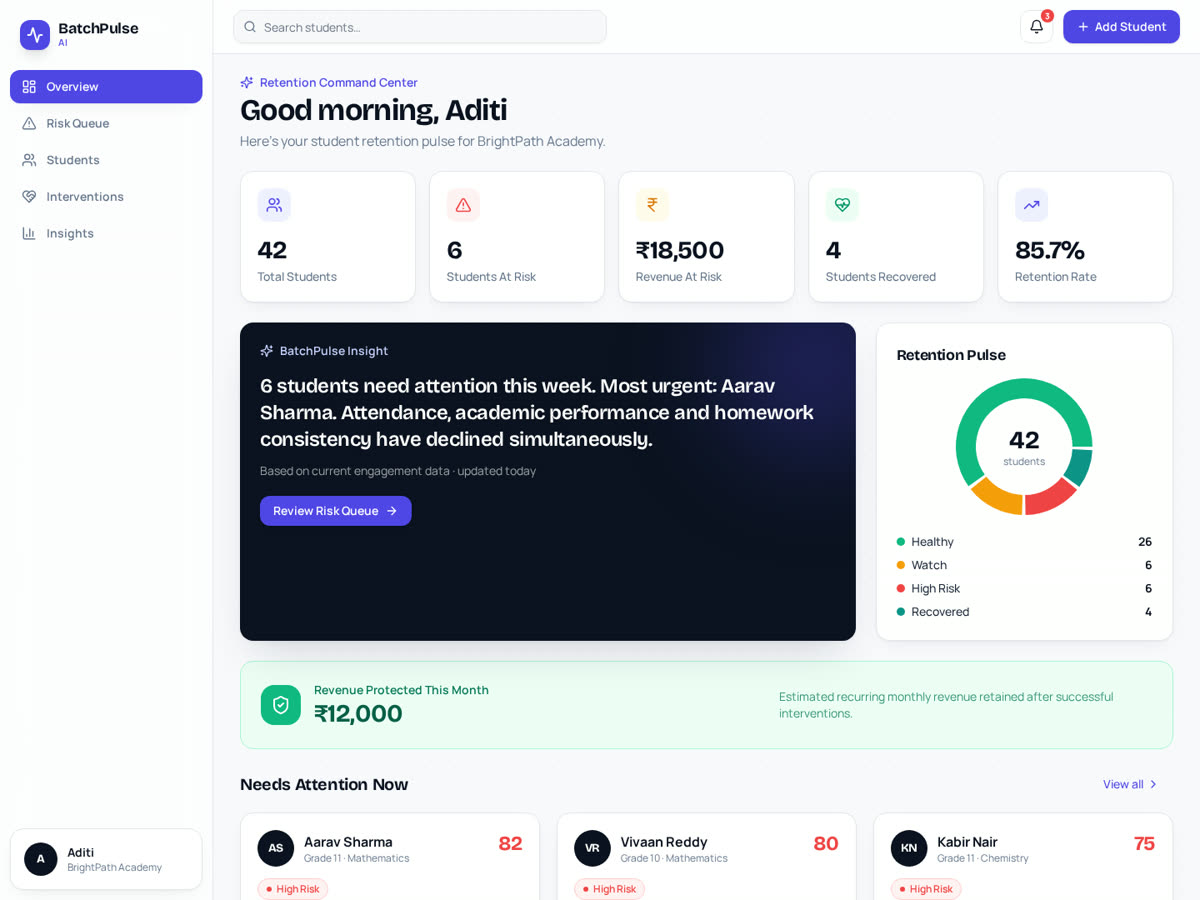
The product consolidates those signals into a retention view: students are categorised by risk, the revenue exposed by that risk is made visible, and the interface leads with who needs attention this week rather than with a full student table.
- 1Open
Attention first
The first screen names who is at risk. Nothing else competes with that, because everything else can wait a week.
- 2Understand
Risk in revenue terms
Each risk category carries the fee exposure behind it, which converts a pastoral concern into a business decision.
- 3Act
The intervention queue
Students move through a queue where the action taken is recorded, so follow-up is a state rather than a memory.
- 4Review
Movement, not snapshots
Trends show how the risk distribution is shifting, so the owner can see whether the intervention pattern is working.
04 — Design decisions
Why this information appears first
Primary
Students needing attention
The only high-emphasis surface. A dashboard that leads with totals gets admired; one that leads with names gets used.
Secondary
Revenue at risk
Placed alongside the names to give the list its urgency, without becoming the thing the owner stares at.
Tertiary
Cohort trends
Useful for review, deliberately quiet — historical charts are the classic reason a dashboard stops producing action.
05 — Decisions & tradeoffs
Choices made for action, and their cost
- 01
Open on intervention, not on data
The owner's scarce resource is attention. Leading with the students who need a call converts the product from a reporting surface into a weekly routine.
Trade-off — Analysts wanting the full record have to navigate to it.
- 02
Express retention risk as revenue
A risk label is easy to postpone. The fee exposed by inaction is a number the decision maker already reasons in, so it drives the decision.
Trade-off — It frames a pastoral issue commercially, which needs careful wording in the interface.
- 03
Use four risk states rather than a continuous score
Healthy, watch, high risk and recovered can be read across a cohort in one glance. A numeric score invites debate about the number instead of the call.
Trade-off — Some nuance between adjacent students is lost.
- 04
Record interventions inside the queue
Without a record of what was already tried, the same student is contacted twice or not at all, and the owner stops trusting the list.
Trade-off — Requires discipline in logging, which is an ongoing user cost.
06 — Role & contribution
Role & contribution
A self-initiated Trust Me Studio product build — not client work. Every student, figure and academy shown in the interface is demonstration data; no schools, customers or retention results are claimed.
Product definition
The retention-risk model and its four states.
UX design
Risk queue and intervention workflow.
Interface design
Dashboard hierarchy and revenue-risk presentation.
Frontend build
Responsive implementation of the working build.
Deployment
Deployment of the working build.
Data shown
Every student, academy and figure in the interface is demonstration data. No schools, customers or retention results are claimed.
07 — Responsive behaviour
Readable between classes, not only at a desk
1440px
Risk queue and revenue exposure sit together, so who to call and why stay in one view.
1024px
Trend surfaces move below the queue; risk categories keep their colour and label pairing.
768px
Single column led by the attention list, with cohort figures following rather than preceding it.
390px
Student rows become cards instead of a squeezed table, so a name, its risk state and the next action stay legible.
08 — Outcome
What the build demonstrates
A workflow designed to surface retention risk before disengagement becomes an exit
A dashboard that answers what to do next, not just what happened
Risk translated into revenue terms for non-technical decision makers
This is a self-initiated build running on demonstration data. No schools, students, revenue or retention results are claimed.
09 — Project gallery
The working build, and what each screen is doing
- What you are seeing
- The retention view of the working build, populated with demonstration data: students grouped by risk state, with the revenue those states expose.
- Why it matters
- The pairing on this screen is the whole argument — a risk category tells the owner what is happening, the revenue beside it tells them why to act this week.
- Problem it solves
- It replaces the report a busy academy owner reads once with a view that ends in a named list of students to contact today.
Want work like this for your project?
Trust Me Studio takes on a small number of projects at a time. If this is the standard you're looking for, start a conversation.