UPLOADFIT
An intelligent browser-based image utility that turns upload requirements into ready-to-submit images — resizing, converting, compressing and validating them in one workflow.
- Type
- Trust Me Studio product
- Industry
- Web Utility / Product
- Year
- 2026
- Focus
- Requirement compliance
01 — The business problem
Upload forms state three constraints and accept nothing less
Upload forms state requirements as a combination of dimensions, file format and file-size limits. Satisfying all three usually means chaining several tools together and re-exporting until the file happens to pass.
The task is trivial and still fails
Format, dimensions and file size are individually easy. Satisfying all three at once is where people chain tools together and re-export until something passes.
The user has no feedback loop
Existing tools optimise one variable. Nothing tells the user whether the exported file actually satisfies the requirement they were given.
The design consequence
The requirement itself had to become the input, and validation against that requirement had to happen before download rather than at the upload form.
02 — Visitor psychology
What stops someone trusting an image tool
Someone arriving here is usually mid-application, under time pressure, holding a document they care about. The interface is ordered around the doubts that arise in that state.
Where does my photo go?
Processing happens in the browser and this is stated where the file is chosen, not buried in a policy page. For identity documents, that answer has to arrive before the upload, or the upload does not happen.
Do I have to sign up first?
There is no account step. Any registration wall placed before a one-minute task is read as a cost larger than the task itself.
Will I have to guess the settings?
The stated requirement is pasted as written, and the tool derives format, dimensions and size targets from it, so the user never translates a requirement into a quality slider.
How do I know it will be accepted?
The output is checked against every stated constraint and reported as ready before the download is offered. Confidence is delivered by the tool, not by trial and error at the upload form.
03 — User journey
From a requirement line to a file that passes
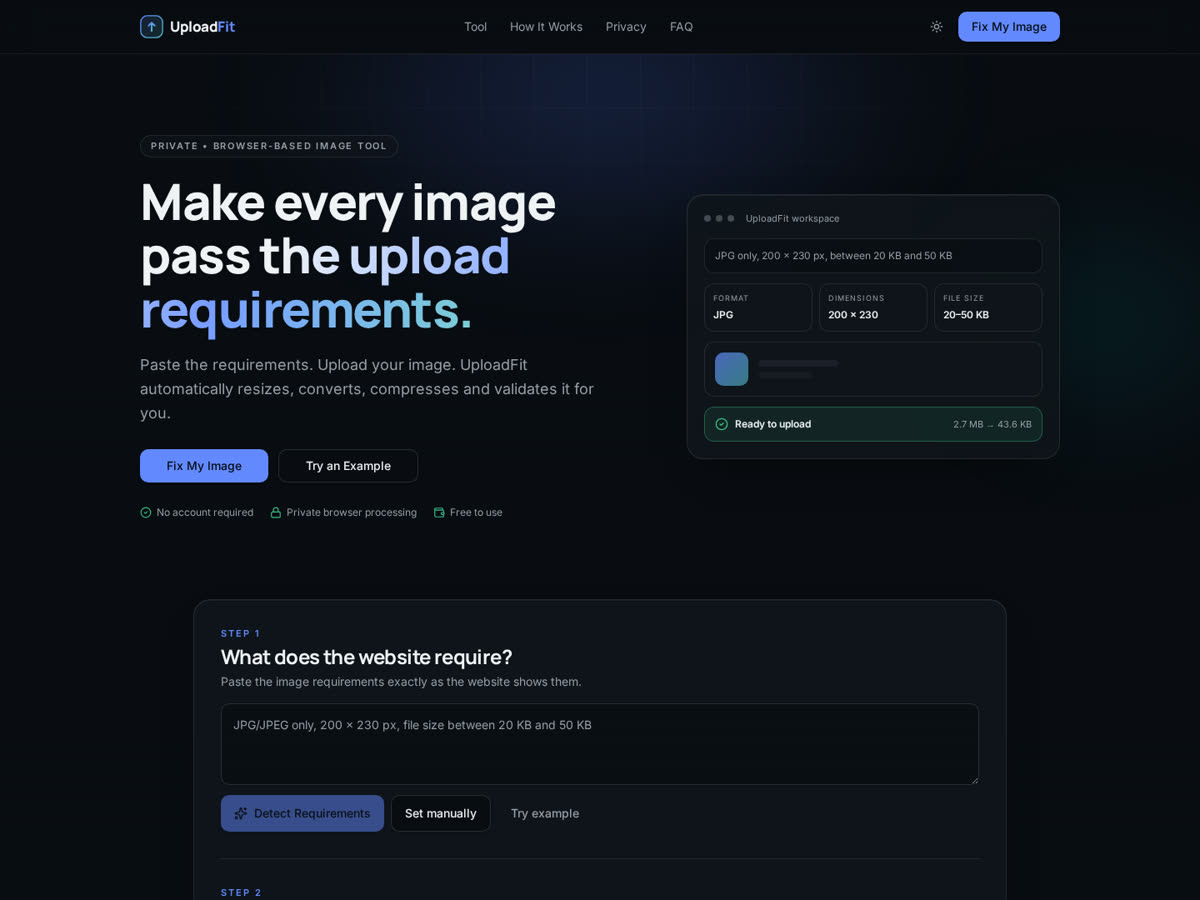
UploadFit takes the requirement text itself as the input. It parses the stated format, dimensions and size range, then performs the resize, conversion and compression needed and validates the result against the requirement before offering the download.
- 1State
Paste the requirement
The constraint text from the form becomes the brief, so the user's job ends where their knowledge ends.
- 2Upload
Choose the image
The file stays in the browser. Nothing is sent to a server, which is what makes the tool usable for documents.
- 3Process
Resize, convert, compress
The three operations run as one pass, driven by the parsed targets rather than by manual settings.
- 4Validate
Confirm before download
Every stated constraint is checked and reported, so the user leaves with certainty rather than a hopeful export.
04 — Design decisions
Why this information appears first
Primary
Requirement input
The first thing on screen, because it is the only thing the user actually knows. Asking for settings first would ask for the answer instead of the question.
Secondary
Validation result
The state that ends the task. It is given equal visual weight to the download so nobody leaves with an unverified file.
Tertiary
Manual adjustments
Available for users who want control, kept quiet so the default path stays a single pass.
05 — Decisions & tradeoffs
Choices made for trust and speed, and their cost
- 01
Process entirely in the browser
The common use case is an identity document or an application photo. A tool that uploads those files has to earn trust it cannot easily earn; one that never sends them does not have to ask.
Trade-off — Very large images depend on the capability of the user's own device.
- 02
Take the requirement text as the input
It removes the translation step where users convert a stated constraint into tool settings — the step where most failed exports originate.
Trade-off — Unusually worded requirements may need manual correction of the parsed targets.
- 03
Validate before offering the download
The user's real goal is acceptance, not a processed file. Verification at the end of the workflow is what removes the retry loop.
Trade-off — A slightly longer path than tools that download immediately.
- 04
No account, no upload queue
The task takes under a minute. Any sign-up step costs more than the problem being solved and would lose the user before the first result.
Trade-off — No history, saved presets or cross-device continuity.
06 — Role & contribution
Role & contribution
A Trust Me Studio product, publicly usable today. No usage, volume or adoption figures are claimed.
Product definition
The requirement-to-validated-file workflow.
UX design
Parse, process and validate sequence with its states.
Interface design
Requirement input, progress and output reporting.
Frontend build
Browser-side image pipeline and responsive implementation.
Launch
Public deployment of the working tool.
Usage claims
No user numbers, processing volume or adoption figures are claimed.
07 — Responsive behaviour
Usable on the device the file is already on
1440px
Requirement input and result state sit side by side, so the check is visible without scrolling away from the controls.
1024px
The workflow keeps its left-to-right order; preview stays large enough to confirm the crop.
768px
Single column in strict workflow order — requirement, upload, result — so no step can be skipped by accident.
390px
Camera-roll upload and the download action are both thumb-reachable; validation is stated in full rather than abbreviated.
08 — Outcome
What the product does
One workflow replaces resize, convert and compress performed in separate tools
Requirements are read as written rather than translated by the user
Output is validated against the constraint before it is downloaded
No account, upload server or sign-up stands between the user and the result
These are capabilities of the shipped product. No usage, volume or performance figures are claimed.
09 — Project gallery
The live tool, and what each screen is doing
- What you are seeing
- The live tool: requirement input at the top of the workflow, with processing and the validated result following in a single vertical sequence.
- Why it matters
- The order on this screen is the product. Requirement before file, and validation before download, is what turns a guessing loop into one pass.
- Problem it solves
- It removes the chain of separate resize, convert and compress tools, and answers the only question the user actually has — will this file be accepted.
Want work like this for your project?
Trust Me Studio takes on a small number of projects at a time. If this is the standard you're looking for, start a conversation.